Pump and level control
Manual and Automatic Pump Control with Signalling, Using a Liquid Level Relay (NO Contact) and Float Switch
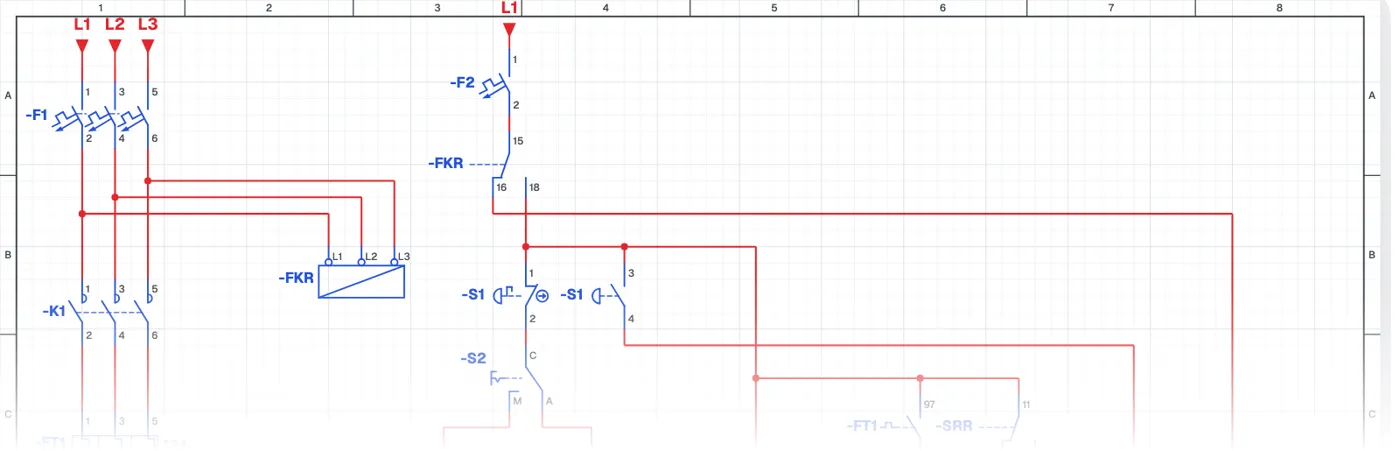
What is a manual-automatic pump panel with indicator lamps?
It is the control circuit of a complete pump panel: a manual-automatic pump system with an emergency stop, a phase monitoring relay and status indicator lamps. The source tank uses a liquid level relay and the target tank a float switch. The lamps on the panel door show the state of the pump and the system at a glance.
Where is it used?
It is used at housing estates, hotels, hospitals, factories and municipal pump stations. The indicator lamps let the maintenance team see the fault without opening the panel: is the pump running, has the overload tripped, is there a phase fault, is there water in the tank, has the emergency stop been pressed.
Power circuit and control circuit
The power circuit has the pump motor, circuit breaker, contactor, overload relay and phase monitoring relay. The control circuit uses both contacts of the emergency stop button, both contacts of the overload relay, the phase monitoring relay's contacts and indicator lamps. Using several contacts of one device for different jobs is the key lesson of this circuit.
What to watch out for
The emergency stop button must be a latching (mushroom head) type and cut the control supply directly. Lamp colours follow the standards and the meaning of each lamp is labelled on the door.
Parts used
- Motor 3~
- M1
- Float switch
- SF1
- Indicator lamp
- H1, H2, H3, H4, H5
Run it in the simulator.
This circuit is ready in the CoilPath library. Open it, press the buttons and follow the current. It also comes with a wiring view and a panel layout.
Related circuits
- Automatic Pump Operation with an Upper-Level Float Switch
- Automatic Pump Operation with a Lower-Level Float Switch
- Automatic Tank Filling Control with Lower and Upper Float Switches
- Manual and Automatic Pump Operation
- Manual Pump Operation with Self-Holding and Automatic Operation by Float Switch
- Running One of Two Pumps with a Selector Switch